Aug
31
2010
0

What’s Special about myLanguage?

Increasingly, UserBase pages are beginning to use Special:myLanguage in links, so what is special about that?  Well, it depends whether you are a reader or a translator.

For readers, it will mean that increasingly they will be taken to pages in their own language.  The way it works is that it is aware of the language that you set in your preferences as your root language – that is myLanguage.  If you click on a link it checks to see if there is a page available in that language, and if there is, that page is displayed.  If no page exists, the English one is displayed instead.  Of course, it only works for those pages that are within our new translation system, so we do need help to enable more of those pages, whether by fresh translations or by copy-and-paste from the old ones.

What’s advantage to translators?  Simply that they no longer have to check for the existence of translated pages before deciding how to define the link.  Using Special:myLanguage means that the moment a suitably translated page is available, it will be displayed from the link.  That’s a time-saver.

It will take time to get all pages to take advantage of this, but it’s certainly a job worth doing, and one that you can help with in the odd hours when you need a change from your usual work.

Written by annew in: Uncategorized | Tags: ,
Jul
15
2010
4

Who does your blog reach?

You won’t be surprised to hear that at Akademy I spent a good deal of time talking to people about UserBase, how we can improve it, and how it can help with documentation problems.  Several exciting improvements are expected in the next few weeks, but I’m leaving that as a teaser for now.  First I want to talk about just one of the ideas that was floated, as we sat watching people stir the barbeque.

Stirring the BBQ, Tampere 2010

I remarked that I often saw things in  blogs that would be interesting to readers, though probably not the whole blog as it talked of technical matters.  As an example, I remarked that in Plasma, things change quickly, yet there is little on UserBase reflecting that.  Chani’s idea was simple.  Have a space to paste the whole blog so that it can be edited down to the parts that users would find interesting.  I liked the idea, and began to wonder how we could create a scratch-pad.  Eventually I realised that I would be just introducing complexity.  There really isn’t a need for a special area.  Every user has a User:UserName page, which can have sub-pages.  All that’s needed is to use that space as a work area, then, when all is finished, to create a link from the relevant application to a new page for the blogs.
Now all I need is someone willing to try it out and give us some feed-back.  Any volunteers?
Written by annew in: KDE | Tags: ,
Jul
08
2010
0

Akademy-Team Rocks!!

My last day at Akademy, and I’ll have more to say later about the things I’ve been doing, but one thing I wanted to say right now -

the local team are absolutely great, have done a wonderful job, and have made it all look so effortless! and we all know it’s far from that. We can’t thank them enough.

Written by annew in: Uncategorized | Tags: ,
Jun
23
2010
0

Can you tell a KeyCap from a MenuChoice?

If so, UserBase needs you.  What we need is not so much geek as bulldog determination.  For our wikis to be really useful in the long run they need to keep to guidelines that will enable them to be used with translation tools – both for localization and for translation to docbook.  Working with our translators we have produced a short guide to which all pages should, in time, adhere.  Since we have so many pages I propose that we tackle small groups at a time, editing them thoroughly, so that they can be marked for translation.  You will find the first four groups on the Translation Workflow page.

If you have a little time to spare while waiting for your application to build, we could really use it – we are looking for long-term benefit.

By the way -

Written by annew in: Uncategorized | Tags: , ,
Jun
10
2010
0

Fast-moving progress with Page Translation

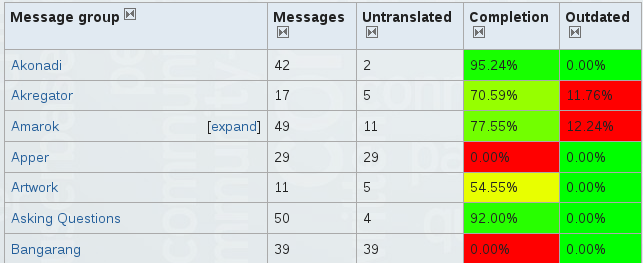
There has been a remarkably fast take-up of the new system, as shown by this graph:

Inevitably we have met a few glitches.  The developers have already fixed a few problems for us, but some of the problems need an awareness when preparing pages for translation.  For the moment we would ask you to read http://userbase.kde.org/Translation_Workflow regularly, to see if new points have been added, and to follow the discussions of other issues on the associated Discussion page.

Soon we will distill the feedback into a Best Practices page, similar to our guidance on PageLayout.  With rapid feedback from translators and the extension developers this should be available in just a few days.

To get a translator account, please email me with your UserBase username, and mention the language(s) you will be using.

Written by annew in: Uncategorized | Tags: , ,
Jun
08
2010
8

Are you joining the Translation army?

Just a reminder – if you are going to trans late in UserBase you need to

  • request addition to the Translator group
  • when you have confirmation, open the page Special:LanguageStats/your-country-code to see which pages need your attention
  • Please don’t use the redlinks in the old language bar – those pages will be lost when migration is complete.
  • Those in the Translation group should be able to see “Translate this Page” on any page that has been prepared.  That link takes you to the page where you choose your language.
Written by annew in: KDE | Tags: , , ,
Jun
08
2010
2

Finally! TranslateWiki is here!

After almost a year of planning we now have the TranslateWiki facility on UserBase!  What difference does that make?  A lot!  For a start, it means a completely new way of working, if you’ve been one of our faithful on-line translators.  It takes a little getting used to, but it has big advantages for the future, and will, in the long run, save you a lot of work.  To explain how, I need to tell you something about its capabilities first.

You can translate a page on-line – more than that, you can translate part of a page and it will happily tell you next time you visit which sections you still need to translate.
You can export a page to a gettext file, allowing you to work with Lokalize or other translation tool.
Because gettext is an option, you can export for use in building a docbook version.

Producing a Manual

A manual can be written on UserBase as a page or set of pages.  When complete it is marked for translation, and a script (currently in preparation) will pass it to the l10n team who will then use the same framework as they currently do for creating docbook manuals.

Off-Line Translations

A similar workflow will be used by i18n translators. Initially their off-line translations will be checked out from SVN to another location, where it can be imported by one of the UserBase team.  As things settle down the off-line translators will be able to do their own imports.

How Does it Work?

Basically, what happens is that the author of a page adds tags which are recognised by TranslateWiki as marking it ready for translation.  TranslateWiki then prepares paragraphs into sections for translation, and sets up a link to the Translate page.  From there you can choose your export or on-line translation and the language you want to work with if you are translating on-line.
If you don’t have time to complete a page, only the remaining sections will be presented for translation next time you visit.
Of course, to get smooth working you ideally want everything prepared from the start, and UserBase has two years-worth of input which needs migrating.

Migration

One obvious question is “What happens to the translations already done for UserBase?”  The work isn’t lost, but can’t be used in that form, because TranslateWiki wouldn’t be able to track it for changes.  That means that we need a determined effort to migrate those translations.  That’s the bad news.  The good news is that you don’t need to be proficient in a language to help.  If you can read enough of a language to determine whether a paragraph matches the English one you are working on, you can simply copy and paste.  We will add an explanation of the process to http://userbase.kde.org/Translation_Workflow – which is started but will be expanded as questions are asked.  Meanwhile, if you can spare a few minutes at odd times there are some smaller tasks at http://userbase.kde.org/Translation_Workflow#Migration which, if done before migration starts, would greatly speed things up.
Come and talk to us on #kde-www.  Take the opportunity to find your way around the system, then join up when we announce the ‘Big Bang’ to migrate as many pages as possible in an agreed time-space.
Written by annew in: KDE | Tags: , , ,
Mar
26
2010
2

KDE Photo Tutorials

Some two years ago Uga wrote some wonderful blogs explaining techniques for quality photo editing (Uga’s Blog).  His host didn’t store the actual photos, and in an unfortunate accident the ones belonging to some of the blogs were lost.  I’d dearly like to have all of these on UserBase.  The remaining blog, 1-1: Levels adjust is referenced on UserBase. There were also

  • 1-2: Curves adjust
  • 1-3: White balance and
  • 1-4: Brightness/Contrast/Gamma + Hue/Saturation/Lightness

We had a link to the last one on UserBase – but it appears to be an incomplete address, so I don’t know whether that was lost too.

With the number of keen photographers in KDE there is a distinct possibility that someone saved a copy of those tutorials.  If they could be located I’d ask permission to put them (in entirety, not as references) in UserBase.

Such tutorials should not be lost.  If you know other material that should also be preserved on UserBase, please let me know.

Written by annew in: Uncategorized | Tags: , ,
Feb
13
2010
3

UserBase is not just for English-speakers!

Current Statistics

It’s a while since I wrote about UserBase, but there’s been plenty of activity.  Let’s look at some statistics, first.  We now have 1,212 content pages and 1,236 uploaded images.  There have been 10,889 page edits since UserBase began – and that will already be out of date by the time you read this.  We have 1,459 registered users, of which 20 have contributed this week.  A year ago that statistic was a mere handful.  The total number of views is now 2,764,290!  Kontact is the most-viewed page – well ahead of the Welcome page – and Akonadi has passed GPU-Performance!  A sign of the times, perhaps.

Top 10 contributors this week

Top 10 contributors this week

Once again the top three places in the Contributions table go to translators.  New contributors since last I wrote are Jzmer, writing about Kimpanel, Afiestas who has undertaken to get the Kbluetooth page sorted out, Aseigo who is writing about Plasmate and Algotruneman – a student on our recent UserBase Editing Klassroom course, who has taken on the difficult twin pages of Krdc and Krfb.

Parlez-vous anglais?

As UserBase has grown, so some of it has become unwieldy, difficult to find for those new to the site, so we have a new initiative to help navigation.  Every English page now carries a Category field at the bottom.   Clicking on that takes you to a page where you can see the list of all pages in the same category.  With a little more work that promises to be very useful.  But what if you are a user with little English, or, even worse, poor skills at reading Latin script?

Clearly we have to do the same categorisation for other languages, but they mustn’t be presented with an English category name.  At the same time, we need standardised category names, to avoid making still more complications, so, after consultation with involved translators we decided that we must make a table of names and ‘approved’ translations.  Hans Chen kindly dented for me, and many people responded quickly,so that we now have 20 out of 31 languages entirely or almost entirely translated in the Category tables.  If you command another language, please take a look at http://userbase.kde.org/Translation_Help_Needed and follow the link to your language, to see whether any more help is needed.

This is just the start of our ‘other language’ support.  We plan to offer translated page names too, which will also mean that searches in other languages will be more successful.  A new tool to make translations easier to manage will be installed shortly, and we’ll put up a page on how to use it.  On-line and off-line translations are supported.  Currently there are many pages with almost no language support, and some translated pages are over a year out of date – something we need to address.  Hopefully this tool will take some of the hassle out of it.  If all goes to plan you will see the start of this within the next few weeks.

What else? Well, the mediawiki engine is to be updated, probably to the same version as is used by Wikipedia, and, oh yes!  A whole new look, based on our new kde.org website, is planned.  Of course our wonderful web team need to draw breath first :-)

Written by annew in: Uncategorized | Tags: ,
Jan
29
2010
7

Machine Embroidery Management is coming to Linux!

I haven’t updated this topic since September, but I’m very excited about the progress so far.  You may remember that one develope, David Boddie, had done some work, with the result that I could build .png files to visualise my patterns within Dolphin, and that we were hoping that the other developer who had shown interest, Purple-Bobby, would join us.  That’s exactly what happened.  David and Robert Forsyth, a.k.a.Purple-Bobby, attacked the problem from different angles, which proved to be very informative, as they could feed on each other’s ideas.

I originally bemoaned the fact that my patterns, in the format .jef, could not be visualised without running Windows.  Some of you may have seen Linus Torvalds’ blog http://torvalds-family.blogspot.com/2010/01/embroidery-gaah.html on much the same subject.  David gave me .png, and Robert gave me .eps files to be used in the same way.  Neither developer can spare huge amounts of time for this project, but although much progress is incremental, sudden leaps forward happen.  It’s this latest leap forward that excites me.

First – an apology to the KTurtle team.  We have borrowed your icon.  This is, of course, temporary, but it reminded us of a X-Stitch pattern, so was the best available until we make our own.

Previewing in Dolphin

So this is a representation of the pattern held in the .jef file.  It’s not so easy to see in a small image, but the pattern is contained on a white background, which denotes the actual extent of stitching, while the yellow border surrounding it denotes the size of the hoop to be used.  The application already can gather a great deal of information about the pattern.  One of the considerations to follow this is whether some of that information could be included alongside the actual preview.  We have to wait to see the practicalities of that.  Meanwhile, take a look at how much information we can already gather:

[anne@anne-laptop JEFPreview]$
./JEFPreview LydgateDesign/ArtNouveau/ArtNouveauPeonies348868.jef
JEF file: LydgateDesign/ArtNouveau/ArtNouveauPeonies348868.jef
Date/time:                                                                     
Thread count: 31                                                               
Stitch count: 56297 between 86 and 141 minutes                                 
Hoop: B 140.0mm x 200.0mm                                                      
Pattern: 123.2mm x 164.4mm                                                     
Threads Used:                                                                  
 1: 219 Olive Green 14.997m                                                   
 2: 213 Beige 14.748m                                                         
 3: 257 Cocoa Brown 21.986m                                                   
 4: 219 Olive Green 1.572m                                                    
 5: 214 Brown 9.322m                                                          
 6: 219 Olive Green 1.304m                                                    
 7: 215 Wine Red 3.264m                                                       
 8: 244 Cardinal Red 5.764m                                                   
 ......
 25: 215 Wine Red 0.594m
 26: 234 Coral 3.267m
 27: 244 Cardinal Red 0.254m
 28: 239 Sunflower 0.203m
 29: 270 Mustard 0.713m
 30: 234 Coral 1.319m
 31: 244 Cardinal Red 0.503m

So we know the number of thread changes, the number of stitches, and approximate time to stitch out.  This is always an under-estimation, because it can’t allow for how much time it takes to thread your needle another 30 times!  You’ll see that already there is a big spread in the estimation – the machine can work at different speeds, depending on the type of materials in use.  Then we have the hoop size and the actual pattern size – corresponding to the yellow and white rectangles in the preview.  Finally you have the thread identification number, name, and amount required for each colour change.

This is an impressive amount of information.  Most of it, if not all, can be obtained from the supplied Windows software, but not all in one place.  You have to access different modules of the software to find some of the information – most inconvenient.  As JEPreview stands it provides 98% of what I need.  I can then simply copy the .jef onto the CF card (the latest version of the machine has USB),  insert the card into the machine and stitch.  Of course, if I want to edit the file, change colours or move elements around, I am, for the moment still dependent on the Windows software.  Maybe one day that will be possible too.

Written by annew in: Uncategorized | Tags: , , ,

Powered by WordPress | Aeros Theme | TheBuckmaker.com WordPress Themes